 Source:
 UEFI Firmware
Download

INFO
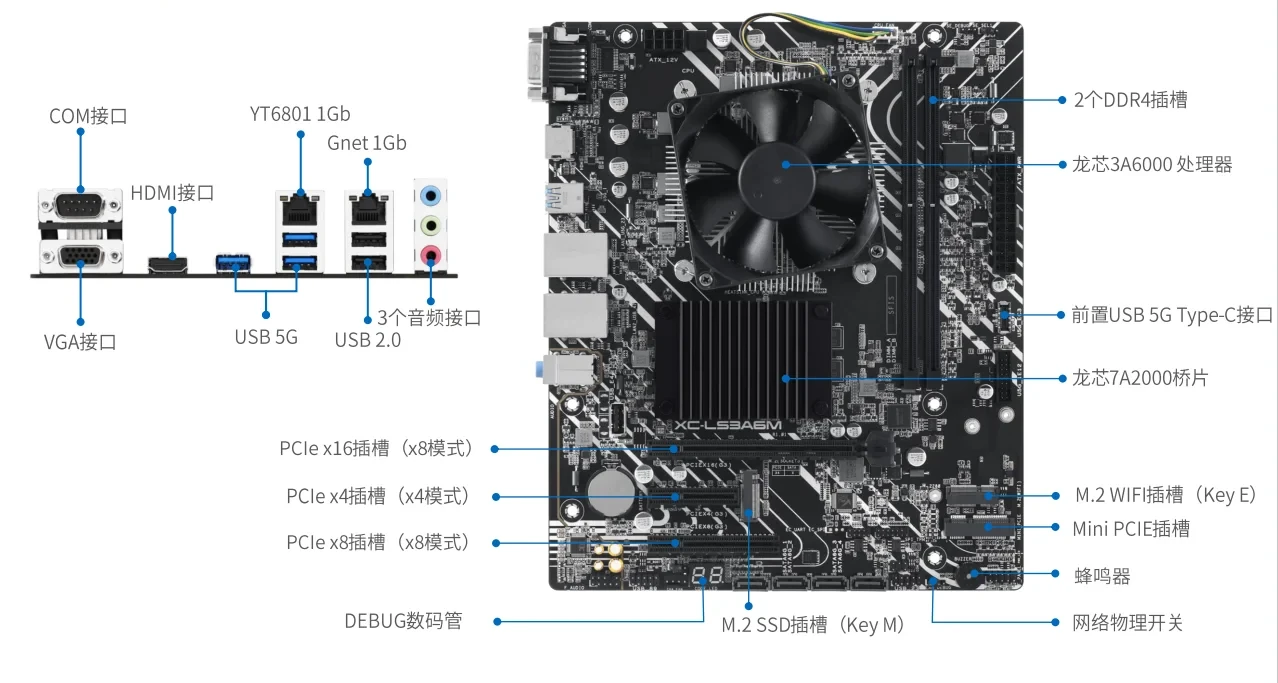
The ASUS XC-LS3A6M is a DTX (203×244mm) desktop motherboard based on Loongson 3A6000-HV.
This motherboard was designed and sold by ASUS and is one of the first third-party Loongson 3A6000 motherboards. The motherboard is known for its overclocking support, dual network ports, and additional onboard USB 3.0 ports.
| Category | Specification |
|---|---|
| Manufacturer | ASUS |
| Form Factor | DTX (203×244mm) |
| Processor | 3A6000-HV @ 2.5GHz |
| Memory | DDR4 @ 3200MT/s (2 × DIMM) |
| Interfaces (PCIe) | PCIe 3.0 x16 (x8 lanes), PCIe 3.0 x8 (x8 lanes), PCIe 3.0 x4 (x4 lanes) |
| Interfaces (USB) | USB 3.0 (3 × onboard, 2 × front panel), USB 2.0 (2 × onboard, 4 × front panel) |
| Interfaces (Storage) | 1 × NVMe (PCIe 3.0 x4), 4 × SATA 3.0 |
| Interfaces (Network) | 2 × GbE |
| Interfaces (Video) | 1 × HDMI, 1 × VGA |
| Interfaces (Other) | 1 × M.2 Key E interface (PCIe + USB), 1 × mPCIe (PCIe + USB), 1 set of 3.5mm (input, output, Line-In) interfaces |